

SSTP is Microsoft’s secure VPN protocol designed to bypass restrictive firewalls.
While modern alternatives like WireGuard grab headlines, SSTP continues serving millions of Windows users worldwide with its unique ability to disguise VPN traffic as regular web browsing.
Understanding what is a VPN deeply provides essential context for appreciating SSTP’s specific advantages in the broader ecosystem of virtual private network technologies.
This Microsoft-developed protocol transforms how remote workers connect to corporate networks by wrapping Point-to-Point Protocol traffic in SSL/TLS encryption.
It resulted in a connection that looks identical to visiting a secure website while providing enterprise-grade security for sensitive data transmission.
This protocol is a mechanism to encapsulate PPP traffic over HTTPS, enabling private network access through SSL/TLS channels.
Table of contents
- Understanding SSTP: The Basics Explained Simply
- How SSTP Protocol Works: Step-by-Step Process
- Security Features That Set SSTP Apart
- Performance Considerations and TCP-over-TCP Challenges
- SSTP vs Other VPN Protocols: Detailed Comparison
- When to Choose SSTP: Ideal Use Cases
- SSTP Configuration and Setup Guide
- Security Benefits and Limitations Analysis
- Performance Optimization Tips
- Troubleshooting Common SSTP Issues
- Future of SSTP in Modern Networks
- Cost-Benefit Analysis for SSTP Implementation
- Closing Thoughts
- Frequently Asked Questions (FAQs)
Understanding SSTP: The Basics Explained Simply
SSTP creates encrypted tunnels between your device and a VPN server by encapsulating PPP traffic through an SSL/TLS channel.
Think of it as placing your data inside multiple protective layers – first PPP packaging, then SSL/TLS encryption, all transmitted over TCP port 443.
This design choice makes SSTP particularly clever. Since port 443 handles all secure web traffic (like online banking and shopping), network administrators rarely block it.
Your VPN connection appears as normal HTTPS traffic to firewalls and proxy servers.
The protocol operates through a client-server model where both endpoints must support SSTP connectivity.
Microsoft integrated this capability directly into Windows Vista SP1 and later versions, eliminating the need for third-party software on most corporate networks.
How SSTP Protocol Works: Step-by-Step Process
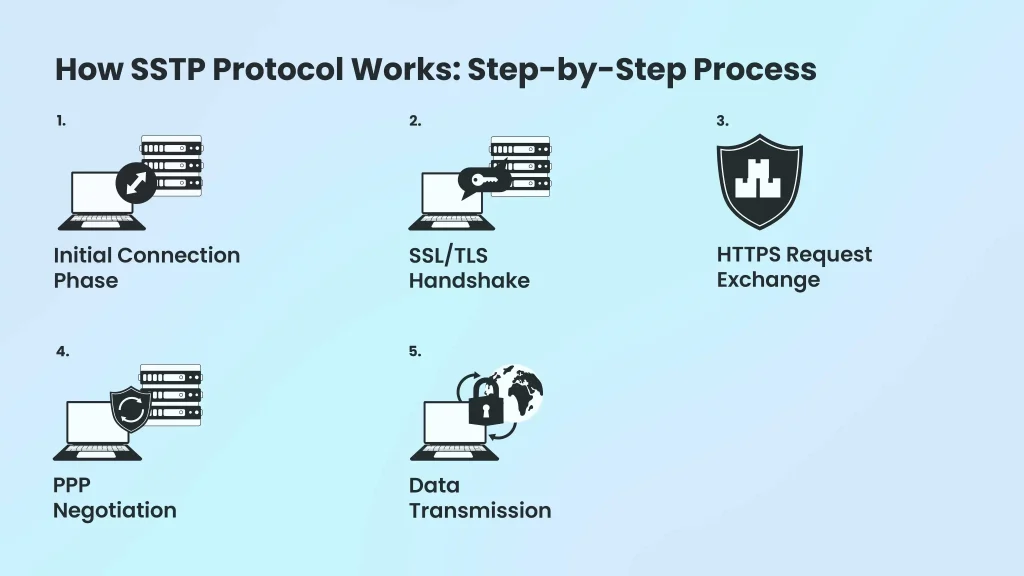
The connection establishment follows a precise sequence that ensures security while maintaining compatibility with existing network infrastructure.
Initial Connection Phase
Your device first establishes a standard TCP connection to the SSTP server using port 443. This mirrors how your browser connects to secure websites, making the traffic indistinguishable from regular web browsing.
SSL/TLS Handshake
Both client and server authenticate each other using SSL/TLS certificates. The server must present a valid certificate, while client authentication remains optional during this phase. This process establishes the encryption parameters for the entire session.
HTTPS Request Exchange
Your client sends an HTTP request with specific headers indicating SSTP capability. The server responds with HTTP 200 status, confirming the secure channel establishment. From this point forward, all communication occurs within the encrypted tunnel.
PPP Negotiation
Once the SSL/TLS tunnel is active, PPP authentication begins. This second authentication layer supports various methods including EAP-TLS certificate authentication and MS-CHAP username/password combinations.
This dual authentication approach significantly strengthens security compared to single-layer protocols.
Data Transmission
After successful authentication, your device receives network configuration details and begins routing traffic through the encrypted tunnel. All subsequent data packets travel wrapped in PPP, then SSL/TLS, then TCP headers.
Security Features That Set SSTP Apart
SSTP’s security architecture combines proven encryption standards with intelligent authentication mechanisms to protect data transmission across untrusted networks.
Military-Grade Encryption Standards
The protocol employs 256-bit AES encryption, meeting the same cryptographic standards used by government agencies and financial institutions.
Understanding the difference between 256 and 128-bit encryption helps appreciate why SSTP’s implementation provides superior protection against modern attack vectors.
This encryption strength makes brute-force attacks computationally unfeasible even with advanced hardware.
Cryptographic Binding Protection
SSTP includes sophisticated defense mechanisms against man-in-the-middle attacks through cryptographic binding. This feature links the SSL/TLS session keys with PPP authentication data, ensuring the client that completed the SSL handshake is identical to the one authenticating via PPP.
Certificate-Based Server Authentication
Every SSTP server must present valid SSL certificates during connection establishment. This requirement prevents attackers from impersonating legitimate servers, as they would need access to properly signed certificates from trusted authorities.
Dual-Layer Authentication
The protocol requires authentication at both SSL/TLS and PPP levels. Even if an attacker compromises one authentication layer, the second layer provides additional protection. This redundancy significantly improves security compared to single-authentication protocols.
Performance Considerations and TCP-over-TCP Challenges
SSTP’s performance characteristics vary significantly based on network conditions, making it suitable for specific scenarios while problematic in others.
The TCP-over-TCP Performance Impact
Since SSTP encapsulates TCP-based PPP traffic within another TCP connection, it suffers from the “TCP meltdown” phenomenon.
The fundamental differences between TCP vs UDP protocols help explain why this architectural choice creates performance challenges when packet loss occurs.
When both inner and outer TCP layers attempt retransmission, cascading delays can severely impact throughput.
This issue becomes pronounced on unstable connections like satellite internet, mobile hotspots, or long-distance wireless links. However, on stable fiber or cable connections with minimal packet loss, SSTP performs competitively with other protocols.
Encryption Overhead Factors
The 256-bit AES encryption process requires significant CPU resources, particularly on older devices. While modern processors handle this load efficiently, mobile devices or legacy hardware may experience noticeable performance degradation during peak usage.
Bandwidth Efficiency
SSTP’s multiple encapsulation layers add overhead to each data packet.
The SSL/TLS headers, combined with PPP and TCP headers, reduce effective bandwidth compared to more streamlined protocols like WireGuard. This overhead becomes more significant for applications requiring maximum throughput.
SSTP vs Other VPN Protocols: Detailed Comparison
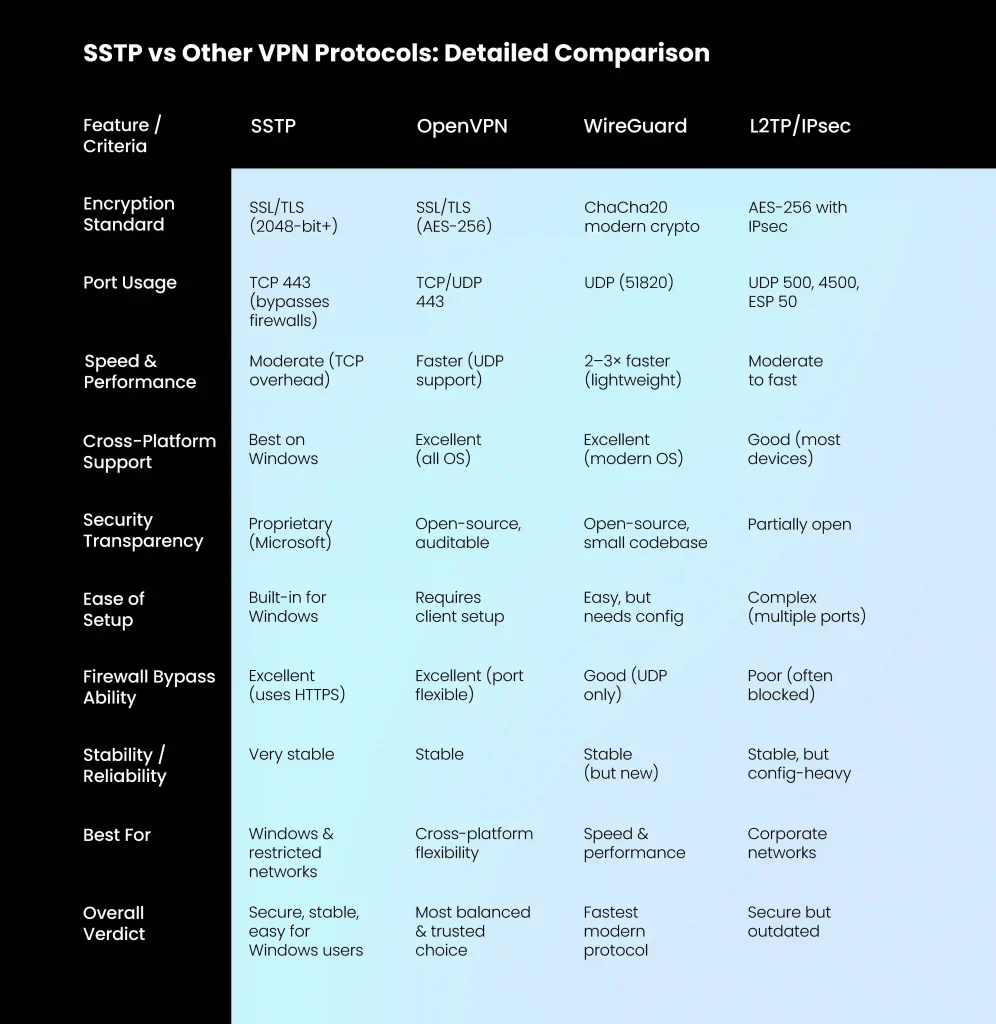
Understanding how SSTP compares to alternatives helps determine the best protocol for specific use cases.
SSTP vs OpenVPN
Both protocols use SSL/TLS encryption and can operate on port 443 for firewall traversal. However, OpenVPN offers superior cross-platform compatibility and benefits from open-source transparency allowing independent security audits.
OpenVPN also supports UDP transport, avoiding TCP-over-TCP performance issues that affect SSTP. SSTP wins in Windows environments due to native integration requiring zero additional software installation. For mixed-OS networks, OpenVPN provides better flexibility despite requiring client software on each platform.
SSTP vs WireGuard
WireGuard represents the modern approach to VPN protocols, using streamlined code and cutting-edge cryptography to achieve superior performance.
Benchmark tests consistently show WireGuard delivering 2-3x faster connection speeds compared to SSTP. However, WireGuard’s static IP assignment raises privacy concerns for some users, and its relatively new status means less extensive real-world testing compared to SSTP’s decade-plus deployment history.
SSTP vs L2TP/IPsec
L2TP/IPsec provides strong security through its dual-protocol approach but requires complex port configurations (UDP 500, 4500, and ESP protocol 50) that many firewalls block. SSTP’s single-port operation makes it significantly more reliable for bypassing network restrictions.
Both protocols offer comparable encryption strength, but SSTP’s simpler setup process gives it advantages in corporate deployments where IT resources are limited.
When to Choose SSTP: Ideal Use Cases
SSTP excels in specific scenarios where its unique characteristics provide clear advantages over alternatives.
Windows-Dominant Corporate Networks
Organizations running primarily Windows infrastructure benefit from SSTP’s native integration. For companies considering VPN white label solutions, understanding SSTP’s Windows-centric advantages helps inform protocol selection decisions.
The protocol requires no additional software licensing or complex client distribution, reducing deployment costs and support complexity.
Highly Restrictive Network Environments
Hotels, airports, corporate guest networks, and countries with internet restrictions often block traditional VPN ports. SSTP’s port 443 operation ensures connectivity where other protocols fail.
Remote Access for Mobile Workers
Employees connecting from unpredictable locations benefit from SSTP’s reliable firewall traversal. The protocol works consistently across different network types without requiring IT support for connection troubleshooting.
Legacy System Integration
Organizations with existing Windows-based remote access infrastructure can extend SSTP capabilities without replacing entire network systems.
This compatibility reduces migration risks and costs.
SSTP Configuration and Setup Guide
Setting up SSTP connections varies depending on your role as either a server administrator or end user.
Server-Side Configuration Requirements
SSTP servers require valid SSL certificates from trusted certificate authorities. Self-signed certificates will cause connection failures on most client devices due to security validation requirements. Proper SSL certificate configuration is crucial for SSTP deployment success, particularly in enterprise environments.
Windows Server installations need the Routing and Remote Access Service (RRAS) role configured with SSTP support enabled. This involves certificate installation, user authentication setup, and network routing configuration.
Client Setup on Windows Systems
Native Windows SSTP clients require minimal configuration. Users access the built-in VPN settings, select SSTP as the tunnel type, and provide server address and authentication credentials. The operating system handles certificate validation and connection establishment automatically.
Third-Party Client Options
Non-Windows systems can use SSTP through third-party clients like SoftEther VPN or sstp-client for Linux systems. These implementations may not support all SSTP features and require additional configuration complexity.
Security Benefits and Limitations Analysis
SSTP provides robust security features alongside certain limitations that users should understand before deployment.
Primary Security Advantages
The protocol’s SSL/TLS foundation leverages years of cryptographic research and real-world testing. Certificate-based server authentication prevents most impersonation attacks, while strong encryption protects data confidentiality.
SSTP’s integration with Windows authentication systems allows leveraging existing Active Directory credentials, smart card authentication, and enterprise security policies without additional infrastructure.
Notable Security Limitations
As a proprietary Microsoft protocol, SSTP lacks the transparency benefits of open-source alternatives. Independent security researchers cannot examine the complete codebase for potential vulnerabilities or backdoors.
The protocol supports only user authentication, lacking device or computer-based authentication capabilities that some enterprise security policies require. This limitation may necessitate additional security layers for high-security environments.
Performance Optimization Tips
Maximizing SSTP performance requires understanding its architecture and implementing appropriate optimizations.
Network-Level Optimizations
Stable, low-latency connections significantly improve SSTP performance by reducing TCP-over-TCP issues. When possible, prioritize wired connections over wireless, and avoid connecting through multiple network hops.
Quality of Service (QoS) configurations can prioritize SSTP traffic, ensuring consistent performance during network congestion. Many enterprise routers support prioritizing traffic on specific ports, including port 443.
Client-Side Performance Tuning
Modern devices with hardware encryption acceleration show improved SSTP performance. Enabling these features in BIOS/UEFI settings can reduce CPU overhead during encryption operations.
Closing unnecessary background applications reduces system resource contention, allowing more CPU and memory allocation to VPN operations.
Server Infrastructure Considerations
SSTP servers benefit from sufficient CPU resources to handle encryption operations for multiple concurrent users. Load balancing across multiple servers prevents performance bottlenecks during peak usage periods.
Troubleshooting Common SSTP Issues
Understanding typical SSTP problems and their solutions helps maintain reliable connections.
Certificate-Related Connection Failures
The most common SSTP issues involve SSL certificate problems.
Expired certificates, incorrect server names, or untrusted certificate authorities cause immediate connection failures.
Verify certificate validity, ensure server names match certificate Common Names, and confirm client devices trust the issuing certificate authority.
Corporate environments may require importing custom CA certificates to client devices.
Firewall and Proxy Complications
While SSTP bypasses most firewalls, some advanced deep packet inspection systems can detect and block VPN traffic regardless of port usage.
Authenticated proxy servers may also prevent SSTP connections.
Testing connectivity using standard HTTPS tools helps identify whether the issue affects all port 443 traffic or specifically targets VPN protocols.
Authentication and Authorization Problems
PPP authentication failures often result from incorrect credentials, expired accounts, or misconfigured authentication servers. RADIUS integration adds additional complexity requiring proper shared secrets and network connectivity.
Enable detailed logging on both client and server to identify specific authentication failure points and resolve credential or configuration issues.
Future of SSTP in Modern Networks
SSTP’s position in the evolving VPN landscape reflects both its continued relevance and emerging limitations.
Continued Windows Integration
Microsoft continues supporting SSTP across Windows versions, ensuring compatibility with current and future releases. Azure VPN services still offer SSTP connectivity, demonstrating ongoing enterprise commitment.
Competition from Modern Protocols
Newer protocols like WireGuard gain adoption due to superior performance and cross-platform compatibility. However, SSTP’s Windows integration maintains its position in Microsoft-centric environments.
Enterprise Migration Considerations
Organizations evaluating VPN protocol changes must balance SSTP’s stability and integration benefits against newer alternatives’ performance and flexibility advantages.
Migration decisions often depend on existing infrastructure investments and security requirements. The protocol remains viable for specific use cases while newer technologies address broader market needs through improved performance and universal compatibility.
Cost-Benefit Analysis for SSTP Implementation
Understanding SSTP’s financial implications helps organizations make informed deployment decisions.
Implementation Costs
Windows-based SSTP deployment requires minimal additional software licensing since the protocol is included with standard Windows Server installations. SSL certificate costs vary based on certificate authority and validation level requirements.
Third-party SSTP server solutions add licensing costs but may provide additional features like centralized management or enhanced monitoring capabilities.
Operational Benefits
Reduced IT support costs result from SSTP’s native Windows integration and familiar user interface. Users require minimal training to connect using built-in Windows VPN clients.
Long-term Considerations
While SSTP deployment costs remain low, organizations should consider future migration costs if protocol changes become necessary. Newer alternatives may offer better long-term value through improved performance and broader device compatibility.
Closing Thoughts
The Secure Socket Tunneling Protocol delivers reliable remote access for organizations prioritizing Windows integration and firewall-bypassing capabilities.
While newer alternatives like WireGuard offer superior speed and cross-platform compatibility, SSTP’s unique combination of native Windows support, SSL/TLS security, and universal port 443 access continues serving specific enterprise needs effectively.
Frequently Asked Questions (FAQs)
SSTP connections will drop and require manual reconnection when switching networks. Unlike protocols like IKEv2, SSTP doesn’t support seamless network transitions.
Expired certificates prevent new connections and may disconnect active sessions. Ensure certificates are monitored and renewed before expiration to avoid service interruptions.
Yes, SSTP works with IPv6 for both tunnel transport and internal traffic. However, mixed IPv4/IPv6 environments require careful configuration of addressing and routing.
Advanced firewalls use deep packet inspection to identify VPN traffic regardless of port. Some organizations also block known VPN server IP addresses through policy enforcement.
Connection limits depend on your Windows Server license, hardware resources, and network capacity. Performance typically degrades before reaching hard limits, so proper capacity planning is essential.
Yes, SSTP supports split tunneling to route only specific traffic through the VPN while other traffic uses your local connection. This optimizes bandwidth and performance.
SSTP typically adds 10-15% overhead due to encryption and multiple protocol layers. The impact is more noticeable with video streaming and large file transfers than with basic web browsing.
![Ultimate White Label VPN Business Guide 2026 [Cost & ROI]](https://symlexvpn.site/wp-content/uploads/2026/01/Ultimate-White-Label-VPN-Business-Guide-2025-Cost-ROI_2-376x114.webp)